

In various situations, customers may short pay an invoice due to reasons such as verbal agreements for discounts, wire payment fees, disputes over quantity or price, shipment issues, or minor write-offs. The Accounts Receivable (AR) department often needs time to investigate and confirm these deductions before they can be accurately posted to the appropriate expense accounts. While it’s possible to temporarily post these short pay amounts to a holding account and manually reclassify them after the investigation, this approach risks delayed and inaccurate expense recognition. D365 Finance offers a deduction management feature that allows users to place these short pays in a deduction workbench during the investigation process. Although deduction management is typically used alongside rebate management to match deductions with customer rebates, this article focuses solely on using deduction management without the rebate management component and any extensive usage of trade allowance.
This series will be divided into 3 parts to cover the various setups and operations involved in deduction management. The first part will focus on the setup process for deduction management. The second part will explore different methods for entering deductions and their respective outcomes. Finally, the third part will delve into the further processing of deductions within the Deduction Workbench.
Deduction Management: Part 2
Deduction Management: Part 3
There are several ways to enter a deduction for customer:
- Customer Payment Journal
- Deduction Workbench
- Customer Settlement Form
- Customer Page
In Part 1 of the Deduction Management series, as mentioned earlier, before using deduction management, there are several sections that need to be set up:
Journal names
(General ledger > Journal setup > Journal names)
a. Claim Journal
A claim journal is needed to record all the deduction events if the deductions are entered through Deduction Workbench, Customer Settlement Form, or Customer Page.
b. Deduction Journal
A deduction journal is needed to match, deny, or write-off deductions.
Both journals are created with the Journal type = Daily.
Rebate management parameters
(Rebate management > Setup > Rebate management parameters)
Although this article will not explain the usage of rebate management with deduction management, the deduction parameters’ visibility are being controlled via the Rebate management parameters.
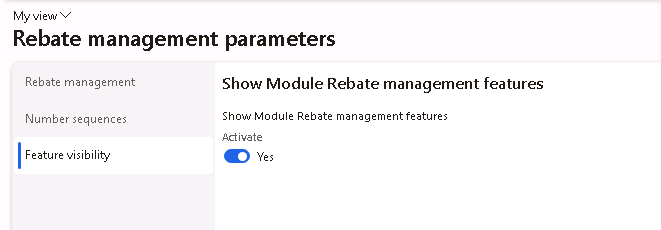
Navigate to the Rebate management parameters, under Feature visibility tab, select “Yes” to activate the Rebate Management Features. Enabling this feature will then display the Deductions tab in the Accounts receivable parameters.
Accounts receivable parameters
(Accounts receivable > Setup > Accounts receivable parameters)
After enabling the Rebate management parameters to display the Rebate management feature, the Deductions tab will be visible in the Accounts receivable parameters.
- Claim Journal Name
Enter the Claim journal name that was setup in the previous step
- Settle customer payment deductions
Define how the customer payment deduction should be settled- Match to invoice – automatically settles deduction transactions using matching invoice provided an open balance is available for the invoice
- Match to open payments – settle deduction transactions using open amount for payments
- Create return order
This is used when quantity-based claim is approved. Select “Yes” to create a return order, and “No” to create a negative sales order.
- Creation without attached invoice
Specify if the system should “Accept”, display “Warning”, or “Error” if the quantity-based claim is approved when no invoice is attached.
- Create return order prior to deduction approval
Specify if the return orders can be created before the quantity-based claim is approved. This setting can only be used when it is a quantity-based claim and the Create return order option is set to “Yes”.

On the Number Sequences tab, setup the Number sequence for Deduction ID.

Trade allowance management parameters
(Sales and marketing > Setup > Trade allowance > Trade allowance management parameters)
The Deduction journal created in previous step needs to be defined in the Trade allowance management parameters.

General ledger parameters
(General ledger > Ledger setup > General ledger parameters)
When D365 Finance creates a claim journal for the deduction entered through Deduction Workbench, Customer Settlement Form, or Customer Page, it creates 2 new customer transactions:
- Offset the amount of claim against original invoice
- Register customer’s debt to the amount of claim while pending claim to be approved
Therefore, we need to select “Yes” for “Allow multiple transactions within one voucher” in the GL Parameters Ledger tab for the system to post these transactions.
Deduction types
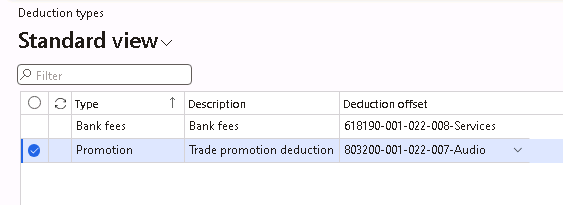
(Sales and marketing > Trade allowances > Deductions > Deduction types)
Deduction types are setup for different deductions that can be given to a customer as well as the offset expense account for these deductions to be posted to.
Deduction reasons
(Sales and marketing > Trade allowances > Deductions > Deduction reasons)
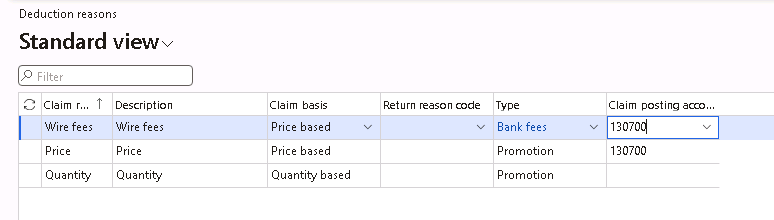
Deduction reasons are required if the deductions are entered through Deduction Workbench, Customer Settlement Form, or Customer Page.
The Claim Basis field determines how the deduction will be given
- Price based will create a free text credit upon approval
- Quantity based will create a negative sales order or return order upon approval
The Return Reason Code field can be entered to be used with the return order created.
The Type field is to associate the Deduction types created in the previous step so that the offset can be posted to the offset account specified in the Deduction types setup.
The Claim Posting Account field is only available when the Claim Basis field is set to Price based. This Claim Posting Account will be used as the Main account value for the free text credit note.
Deduction denial reasons
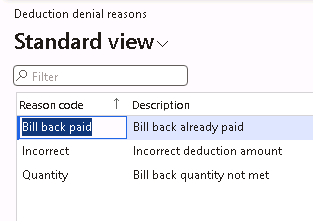
(Sales and marketing > Trade allowances > Deductions > Deduction denial reasons)
Deduction denial reasons need to be setup for when a deduction is denied.
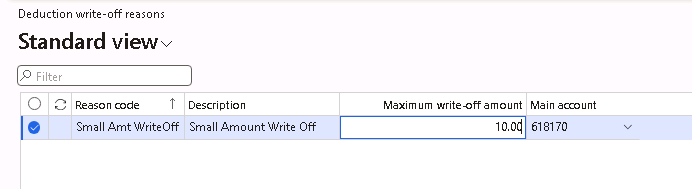
Deduction write-off reasons
(Sales and marketing > Trade allowances > Deductions > Deduction write-off reasons)
The deductions can be written-off if it is approved and it will need a write-off reason that determines the maximum amount that can be written-off under this reason as well as the main account to post this write-off to.
Note that a 0.00 amount for the Maximum write-off amount means there will be no limit set for the Maximum write-off amount under this reason code.
Optional: Automatic settlement for approved deductions
(Sales and marketing > Periodic tasks > Settle approved deductions)
If approved deductions should be automatically settled with credits that have matching Deduction ID values and amounts, then user can set this up to run on a recurring basis in batch to reduce manual settlement task.






Leave a Reply