Payment proposal in D365 Finance is often used to quickly select vendor invoices for payment that meets the selection criteria based on due date, cash discount date, or a range of invoice dates. However, there might be times when the payment proposal is generating multiple lines of payment on the payment journal instead of grouping them into 1 payment line only.
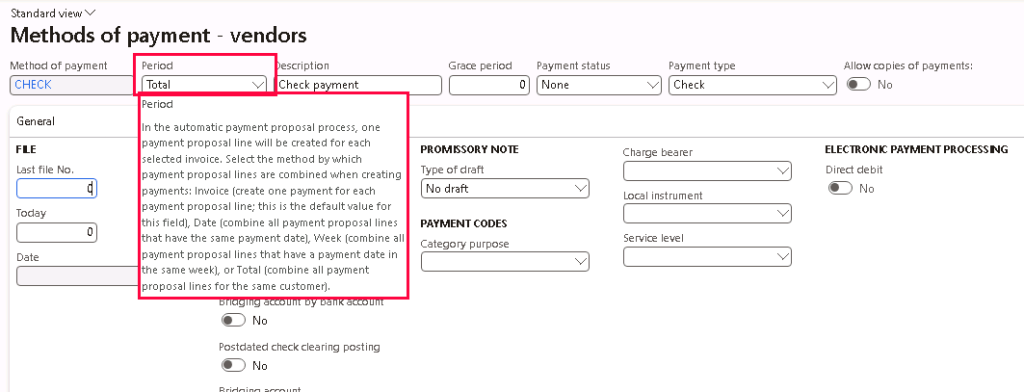
If you are expecting for the payment proposal to generate only 1 payment line for the vendor, first of all, make sure the Method of payment setup has a Period of “Total” to combine all the payment proposal lines for the same vendor.
Other Period options:
- Invoice – One payment line per invoice number
- Date – One payment line per payment date
- Week – One payment line per payment date in the same week
If despite having the Method of payment Period of “Total”, the payment proposal is still not grouping all the payments for the same vendor into 1 payment line, then there might be 7 other contributing factors that are causing the payment proposal to be broken up into multiple payment lines.
1. Payment date
Although you selected “Total” as the Method of Payment’s Period and not “Date” / “Week”, the invoice proposal will still group the payment lines based on the payment date as that will be the posted date as well, therefore 2 separate lines are needed for the vouchers.


Payment date 2/28/25: Invoice 80193 + Invoice 09310 = $5,371.19
Payment date 2/25/25: Invoice 309 + Invoice 7093 = $5,912.03
2. Method of payment
This should be an obvious one since each method of payment has different setups and payment generations, so it would make sense for the payment proposal to create multiple lines for the payment journal.


Method of payment = Check : Invoice 09310 + Invoice 7093 = $6,385.09
Method of payment = Blank : Invoice 80193 = $4,589.10
Method of payment = Electronic: Invoice 309 = $309.03
3. Payment specification
Similar to Method of payment, the Payment specifications are attached to the Method of payments and they payments are generated separately for each payment specification, so the payment proposal will split them up based on payment specifications as well.


Payment specification = CCD : Invoice 80193 + Invoice 09310 + Invoice 309 = $5,680.22
Payment specification = Blank: Invoice 7093 = $5,603.00
4. Vendor bank account
Although you might not doing an ACH payment, if on the payment proposal, the invoice line has a different Vendor bank account than the rest of the invoice lines, it will also be separated into a separate payment line on the payment journal.


Vendor bank account = Test : Invoice 80193 = $4,589.10
Vendor bank account = Blank: Invoice 09310 + Invoice 309 + Invoice 7093 = $6,694.12
5. Payment bank account
If the payment bank account is different, it will split the payment lines in the payment journal as well because it will generate payment for separate banks and be booked into each bank accounts respectively.


Bank account = USMF OPER: Invoice 80193 + Invoice 09310 = $5,371.19
Bank account = Blank : Invoice 309 + Invoice 7093 = $5,912.03
6. Currency
Payment proposal will be split into multiple payment lines if there are different currencies so that they have a separate voucher number and can be revalued separately during FX revaluations.


Currency = CAD: Invoice 0225-10 = CAD 497.50
Currency = USD: Invoice 80193 + Invoice 09310 + Invoice 309 + Invoice 7093 = USD 11,283.22
7. Remittance location
This is often overlooked especially if the vendor has multiple remit-to addresses. It would make sense for the payment proposal to split different remittance addresses into multiple payment lines especially if it is a check payment so that the checks are going to the right locations for different invoices.


Remittance location = Acme Office Supplies: Invoice 09310 + Invoice 309 = $1,091.12
Remittance location = Acme Remittance : Invoice 80193 + Invoice 7093 = $10,192.10




 D365 Deep Dive
Leave a comment