

There are times when the journals’ workflows in D365 Finance are stuck in an “Unrecoverable” state or has an “In Process” state but cannot be approved/recalled.
When this happens, usually users might have to engage with Microsoft support to execute a script to reset the workflow status of these journals to “Draft” and resubmit it again.
However, in 10.0.41, D365 Finance has enhanced the function and created a self-service repair periodic task that allows administrators to reset the workflow approval status of an unposted journal entry to “Draft” or “Not submitted”.
General ledger > Periodic tasks > Reset workflow approval status for unposted journal
This page shows the journals that satisfy following criteria:
- Belongs to current legal entity
- Unposted journals
- Not system blocked journals
Administrators can select the journal that is facing the issue and click on “Reset to draft” and the journal would be back to “Draft” state again.
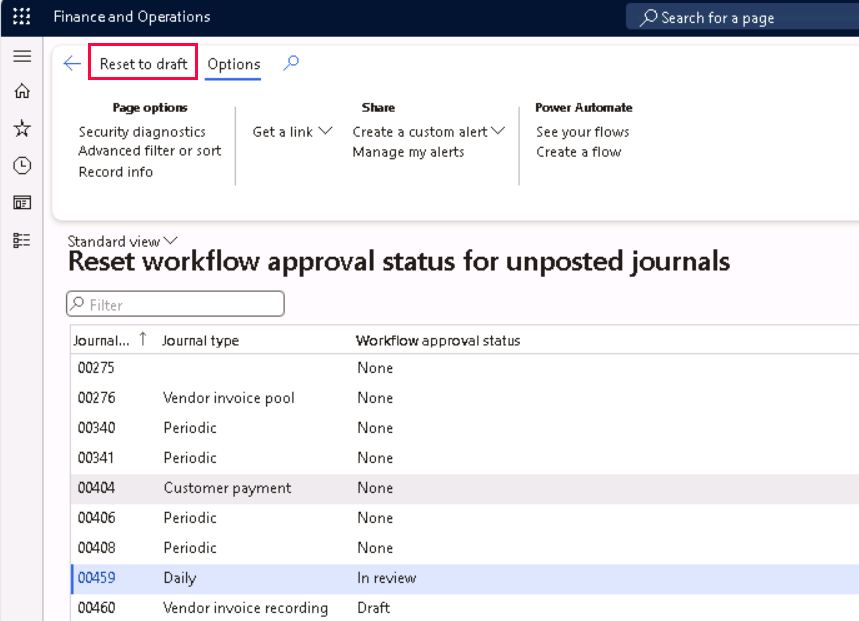
This page might also be useful to look at all the unposted journals for the current legal entity and its workflow approval status in a single page, instead of having to navigate to the different pages of Vendor invoice, Vendor payment, Customer payment, General Journal, Allocation Journal, etc.



 D365 Deep Dive
Leave a comment